

As many of you know I've been beta testing Windows 10 for months now and it finally releases to the public tomorrow. While it seems fine for the most part I do not advise jumping in right now unless you have a secondary device to upgrade while they work out some of the remaining quirks.
As I've mentioned the upgrade is free for Windows 7 and 8 users at least for this coming year. I have heard a rumour that after two years they will start charging for updates but I can neither confirm or deny the validity of that one.
If you have anything you'd like to ask about Windows 10 feel free to comment below.
If I download it for my Playstation 4, will it be natively backwards compatible with PS3 games?
What are the core differences from 8? Can I left click the Windows icon on the bottom left of the screen? Can I left click the Windows icon on the bottom left of the screen? Can I left click the fucking Windows icon in the bottom left of the screen or will I have to put up with the right clicking bullshit that pisses me off and throws me off every damn time? Also, when did 9 come out, cause i feel like I'm on 8.1 and now hearing about 10 and do not remember anything about a 9?
Left clicking brings up the menu as you see in the screenshot. You can actually size it to take up less space too or use that menu full screen on a tablet.
Oh and they skipped 9.
Which is weird, cause don't people tend to consider every other OS they put out inferior? Like XP was good then everyone hated Vista, then 7 was good but everyone hated on 8 then they just jumped to the bad number?
I'm thinking of setting/trying it up on my Win 7 Laptop, and then buy a copy on a flash drive to use it for my gaming rig.
Its worth checking out. There are some improvements but since Windows 10 is Windows as a service you can't control Windows updates like you used to be able too. Some people have reported problems with Nvidia Graphics cards too.
Well I will just have to wait until they iron out the kinks because both my computers have Nvidia cards. Not a big deal. I've waited this long. I can wait a little longer.
I have a problem with my AMD driver stopping and restarting randomly too. Sometimes it will do it several times in the space of a minute and then not again for an entire session. I've updated the driver but no luck.
New Nvidia drivers are now available from Windows update if you're feeling brave. :)
Oh cool, Thanks for telling me.
So I was thinking about upgrading after I install new ram in my computer, or maybe before. The way i figured, the computer already has memory allocation problems, maybe if I had a fresh install of windows, it would improve? I dunno though. What do you think, Peter?
Hmmm, I'm not sure it will help at all since it's just going to upgrade over top of your current OS. How do these memory allocation errors manifest themselves? Error message of some sort?
It usually freezes up but sometimes theres a message. I forget what it is. But ive monitored my memory usage and its almost always full. I have 8 gigs. I was thinking with sixteen it might fix itself.
You shouldn't be experiencing high memory or CPU utilization while doing nothing. If you have a ton of apps open or are trying to run a game with high requirements then I can see it but not while surfing the web or writing a doc. 8 GB is plenty of memory.
Your usage should look something like this in Task Manager if you are just idling. My CPU was only at 9% after I started Snagit to take a screenshot. It was sitting at 0% beforehand. You need to see which apps and processes are consuming your memory.
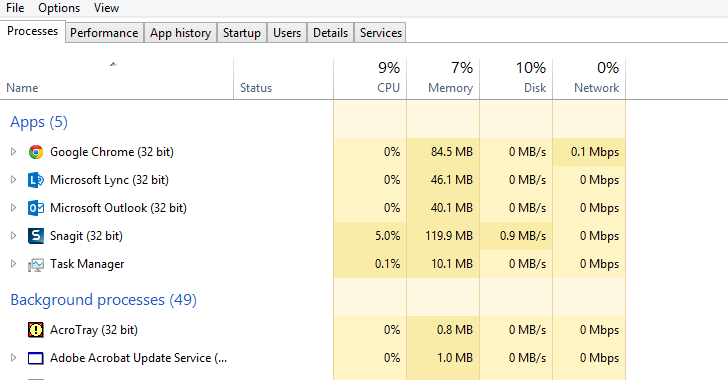
yeah chrome seems to suck up all my memory. It's commonly at 80 to 90 percent filled. It seemed to be time oriented, like it crashes after a period of time, repeatedly, like it fills up over time and doesn't clean up.
I don't know a lot about computers. Does that make sense?
I'd be afraid to upgrade my Win 7 laptop to Win 10. Maybe once I back up everything, I'll think about it, but I can't even update iTunes anymore because the new versions just don't work, or have problems I can't fix.
I'm currently waiting for my little Windows PC to restart so I can try Windows 10. This part seems to be taking forever.
See my replies to your tweets. LOL Any questions, let me know.
Will do. Currently I am at 13% of the black Upgrading Windows screen so now its just a waiting game.